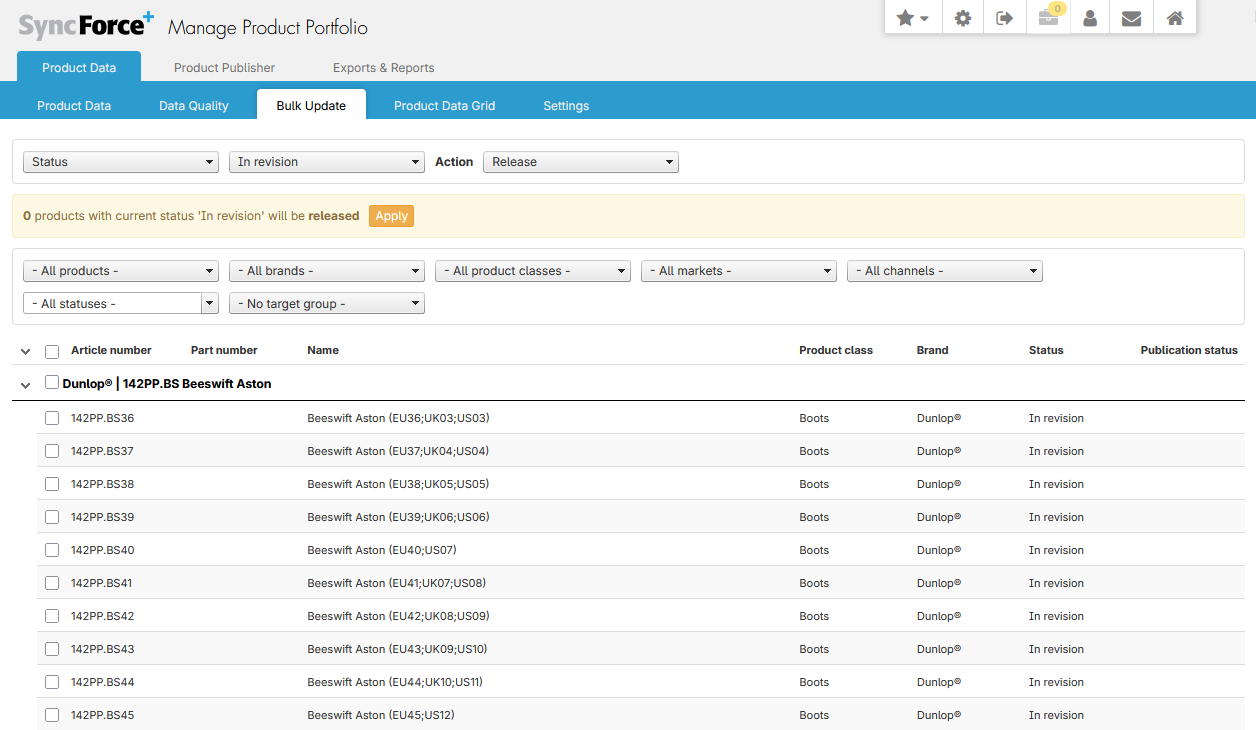
Sometimes you have the need to bulk Release a lot of your In revision products. For example after a bulk import made a lot of updates or when meta data translations were set that affect a lot of products. Or a lot of products have been released but not yet published to the data channels and thus are lagging behind.
Steps
- Go to Manage Product Portfolio => Bulk Update and change the first pull down menu from "Attribute" to "Status".
- Select the current status in the second pull down menu
- Select the action in the third pull down menu
- Use the filters to narrow down the product shown in the list, if applicable
- Select the products you want updated (note the Select all checkbox just to the left of the header Article Nr.)
- Click on the Apply button
- In the background the status for the products will change / publication requests are created, so it might take a while before everything is processed and shown as such in the Product list.
Note that you can only schedule 1000 products to be released each time. So if you need to do more, you have to repeat the above steps, but you do not have to wait for the previous ones to be completed. Products that are scheduled to be re-released will NOT be displayed in the Bulk Update form, even though their status is still In Revision.